> ## Documentation Index
> Fetch the complete documentation index at: https://docs.simbas.ai/llms.txt
> Use this file to discover all available pages before exploring further.
# Quickstart
> How to use the AI Itinerary Generator
### **AI Itinerary Generator**
The **AI Itinerary Generator** allows you and your team to create detailed, customer-ready itineraries in just a few minutes.
This feature streamlines the **sales and quoting process**, helping you send personalized quotes to clients as quickly as possible.
### **Navigating to the AI Itinerary Generator**
You can access the AI Itinerary Generator in two ways:
1. From the dashboard under **“Itineraries”**:
👉 [https://simbas.ai/dashboard/itineraries](https://simbas.ai/dashboard/itineraries)
2. From the **AI Chat**, by clicking **“Generate Itinerary”** after adding notes about the trip in the Notepad.
### **Generating an Itinerary from the Dashboard**
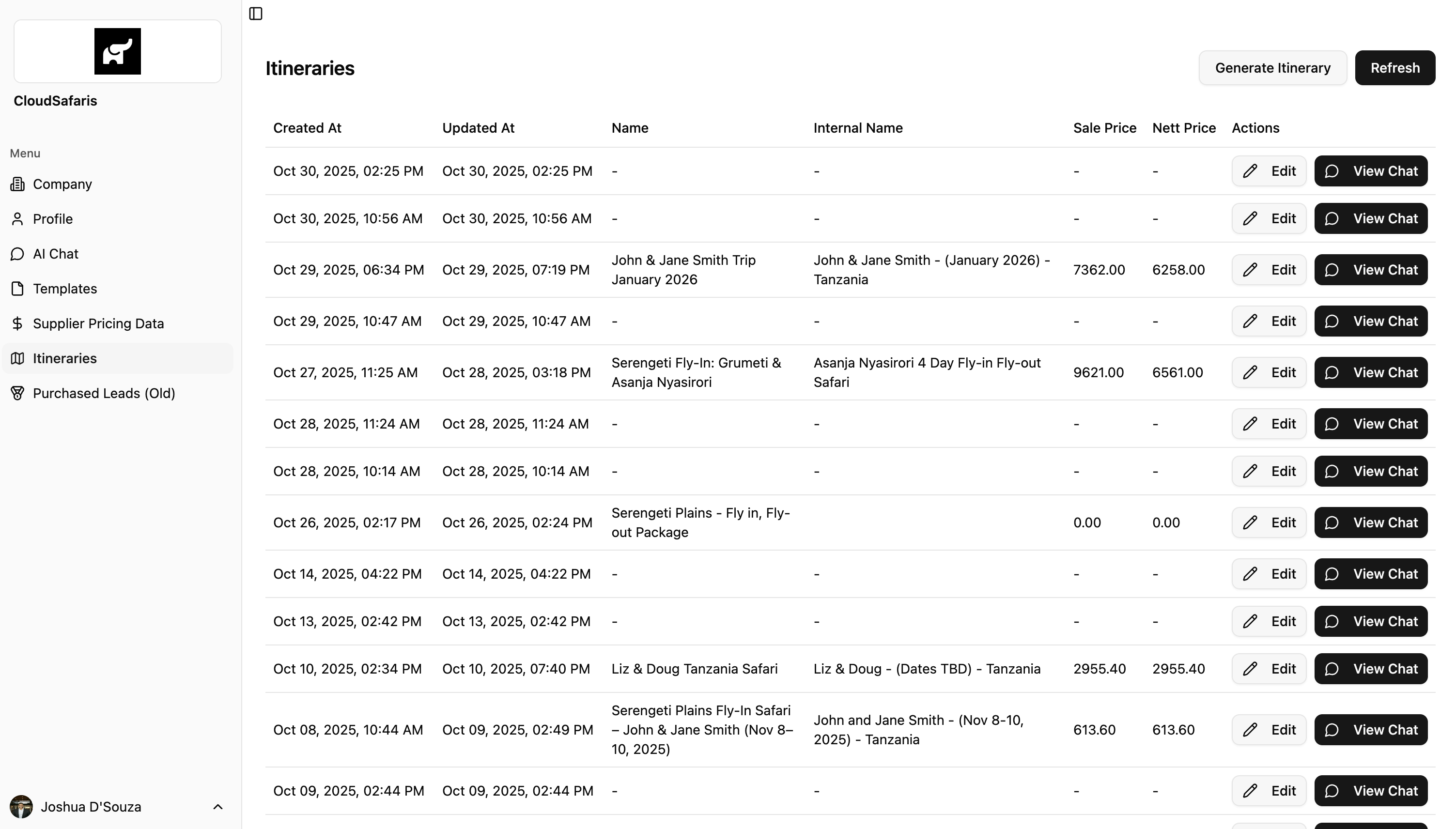
1. Go to the **Itineraries** section on your dashboard.
2. Click **“Generate Itinerary.”**
* Each itinerary also includes options to **“Edit”** or **“View Chat.”**
* **Edit** — opens the itinerary in an editable view for adjustments.
* **View Chat** — opens the AI Chat connected to that itinerary.
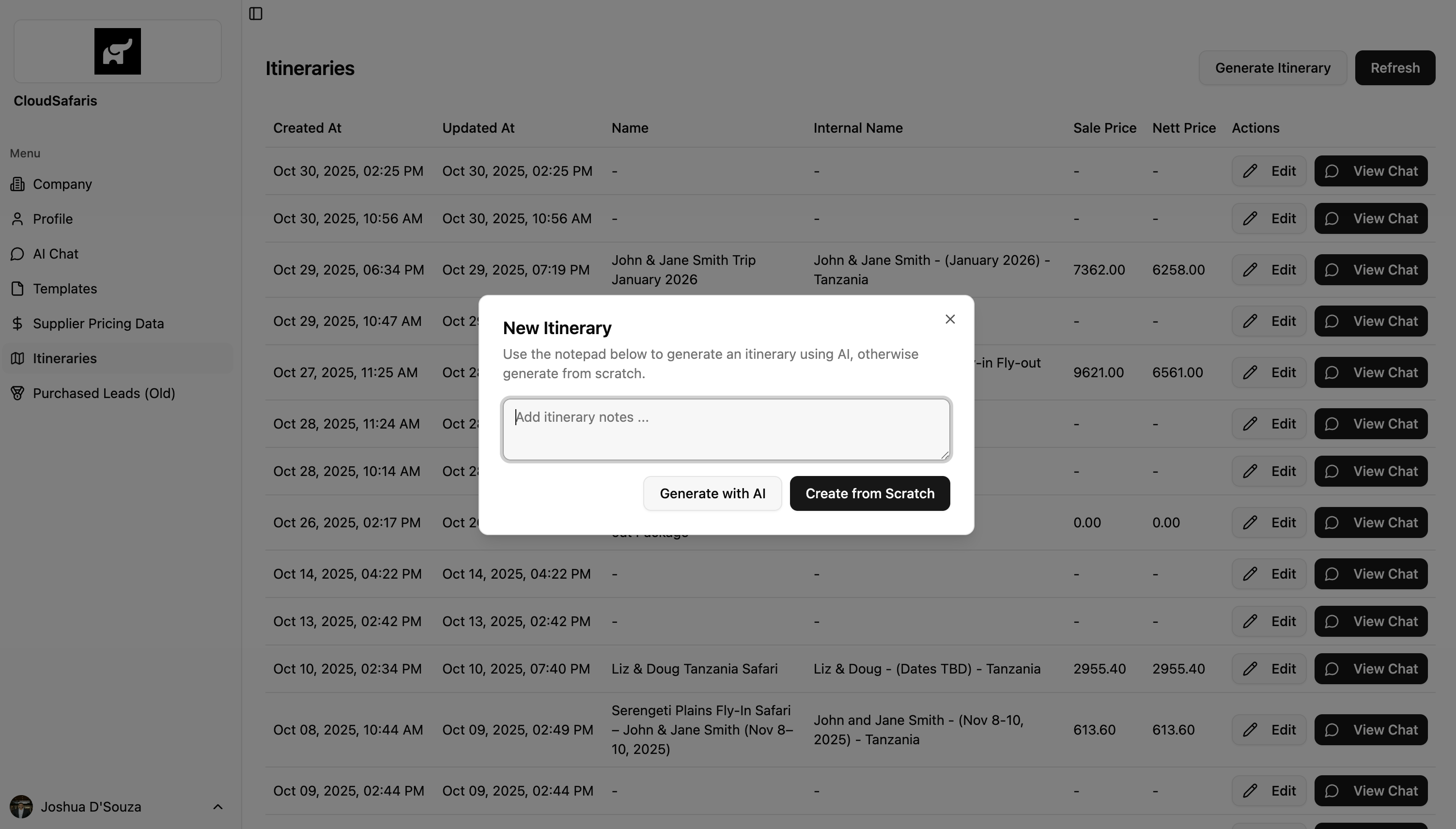
3. After clicking **“Generate Itinerary,”** a modal will appear where you can enter the itinerary details.
4. Add your itinerary notes or trip details.
5. Click **“Generate with AI.”** Within a few minutes, the system will generate a complete, shareable itinerary ready to send to your customer.
 #### **Example Input for the Itinerary Generator**
You can add a short prompt or detailed notes in the text area to guide the AI.
**Example:**
> “4-day fly-in fly-out safari from Arusha to Serengeti (Seronera), staying at Conserve Safari Serengeti.”
**Detailed Breakdown Example:**
**Start of Itinerary**
**Day 1:**
* Pick up from JRO Airport and transfer to Arusha for your overnight stay.
* Overnight at **Gran Meliá Arusha**.
**Day 2:**
* Transfer from Gran Meliá Arusha to **Tarangire National Park** for your first safari.
* Overnight at **Conserve Safari Tarangire**.
**Day 3:**
* Morning game drive and breakfast.
* Transfer back from Conserve Safari Tarangire to Arusha, exiting through the park gate.
**End of Itinerary**
### **Creating an Itinerary from Scratch**
If you prefer, you can start with a blank itinerary.
Simply click **“Create from Scratch”** to open an editable itinerary where you can manually add all details as needed.
### **Generating an Itinerary from AI Chat**
To generate an itinerary directly from the AI Chat, refer to the **AI Chat Notepad** section for step-by-step instructions:
👉 [https://docs.simbas.ai/ai-chat/notepad#generating-an-itinerary](https://docs.simbas.ai/ai-chat/notepad#generating-an-itinerary)
#### **Example Input for the Itinerary Generator**
You can add a short prompt or detailed notes in the text area to guide the AI.
**Example:**
> “4-day fly-in fly-out safari from Arusha to Serengeti (Seronera), staying at Conserve Safari Serengeti.”
**Detailed Breakdown Example:**
**Start of Itinerary**
**Day 1:**
* Pick up from JRO Airport and transfer to Arusha for your overnight stay.
* Overnight at **Gran Meliá Arusha**.
**Day 2:**
* Transfer from Gran Meliá Arusha to **Tarangire National Park** for your first safari.
* Overnight at **Conserve Safari Tarangire**.
**Day 3:**
* Morning game drive and breakfast.
* Transfer back from Conserve Safari Tarangire to Arusha, exiting through the park gate.
**End of Itinerary**
### **Creating an Itinerary from Scratch**
If you prefer, you can start with a blank itinerary.
Simply click **“Create from Scratch”** to open an editable itinerary where you can manually add all details as needed.
### **Generating an Itinerary from AI Chat**
To generate an itinerary directly from the AI Chat, refer to the **AI Chat Notepad** section for step-by-step instructions:
👉 [https://docs.simbas.ai/ai-chat/notepad#generating-an-itinerary](https://docs.simbas.ai/ai-chat/notepad#generating-an-itinerary)