> ## Documentation Index
> Fetch the complete documentation index at: https://docs.simbas.ai/llms.txt
> Use this file to discover all available pages before exploring further.
# Quickstart & Navigation
> How to get started with Simbas.AI
### Create an Account
To create your [Simbas.AI](http://Simbas.AI) account, visit:
👉 [https://simbas.ai/register?signup](https://simbas.ai/register?signup)
Follow the sign-up process to set up both your **personal profile** and your **company profile**.
### **Logging In**
If you already have an account, log in here:
👉 [https://simbas.ai/register](https://simbas.ai/register)
### **Navigation**
Once you’ve completed onboarding or logged in, you’ll be redirected to your **dashboard**, where you’ll find the main navigation menu.
From here, you can easily access key sections of the platform — including your itineraries, properties, chat assistant, and account settings.
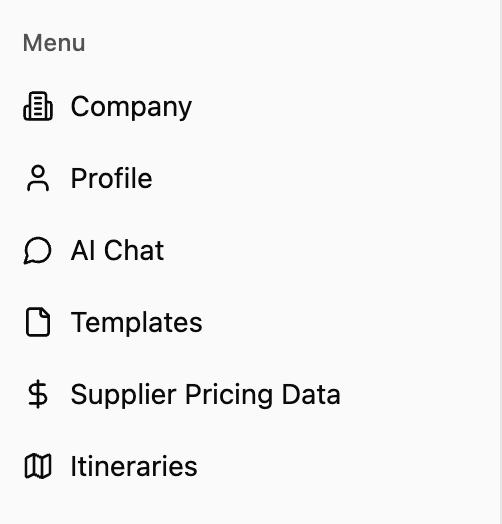 Selecting **“Company”** opens a pop-up where you can view and edit your **company information**, including business details, contact info, and branding preferences.
Selecting **“Profile”** opens a pop-up where you can edit your **personal **[**Simbas.AI**](http://Simbas.AI)** profile**, including your name, email, and account preferences.
**AI Chat** is one of [Simbas.AI](http://Simbas.AI)’s core features — a ChatGPT-style interface that lets you interact with your uploaded data in real time. Use it to check **availability**, **rates**, **policies**, and more, all through natural conversation.
**Templates** store structured notes and pre-set responses for your team. They allow for **quick access** to commonly used messages or itinerary components directly within the AI Chat notepad.
**Supplier Pricing Data** contains stored rate and availability information for your properties, lodges, or partners. This data is accessible through AI Chat and currently powers the **Dynamic Itineraries (BETA)** feature.
Selecting **“Itineraries”** takes you to the page where you can **create a new itinerary from scratch** or **pre-generate one using AI**. You can also view and manage all of your **saved itineraries** from this section.
Selecting **“Company”** opens a pop-up where you can view and edit your **company information**, including business details, contact info, and branding preferences.
Selecting **“Profile”** opens a pop-up where you can edit your **personal **[**Simbas.AI**](http://Simbas.AI)** profile**, including your name, email, and account preferences.
**AI Chat** is one of [Simbas.AI](http://Simbas.AI)’s core features — a ChatGPT-style interface that lets you interact with your uploaded data in real time. Use it to check **availability**, **rates**, **policies**, and more, all through natural conversation.
**Templates** store structured notes and pre-set responses for your team. They allow for **quick access** to commonly used messages or itinerary components directly within the AI Chat notepad.
**Supplier Pricing Data** contains stored rate and availability information for your properties, lodges, or partners. This data is accessible through AI Chat and currently powers the **Dynamic Itineraries (BETA)** feature.
Selecting **“Itineraries”** takes you to the page where you can **create a new itinerary from scratch** or **pre-generate one using AI**. You can also view and manage all of your **saved itineraries** from this section.
 ### **Profile & Account Options**
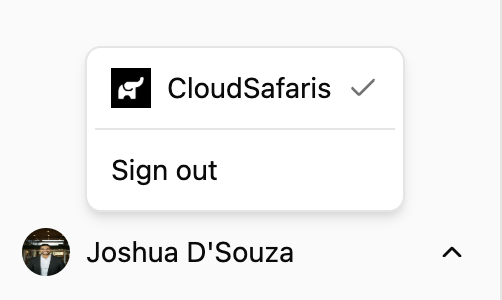
At the bottom of the navigation menu, you’ll see your **name** and **profile image**.
Clicking on your name opens a menu where you can:
* **Sign out** of your account
* **Switch between organizations**, if you’re part of multiple teams or companies
### **Profile & Account Options**
At the bottom of the navigation menu, you’ll see your **name** and **profile image**.
Clicking on your name opens a menu where you can:
* **Sign out** of your account
* **Switch between organizations**, if you’re part of multiple teams or companies