> ## Documentation Index
> Fetch the complete documentation index at: https://docs.simbas.ai/llms.txt
> Use this file to discover all available pages before exploring further.
# Quickstart
> Supplier pricing and how to use it within the chat.
Within the [Simbas.AI](http://Simbas.AI) dashboard, the **Supplier Pricing Data** section stores pricing information from your suppliers.
This data allows your team to quickly access and query **nett** and **rack rates** directly through the **AI Chat**, ensuring faster and more accurate responses when building itineraries or quoting clients.
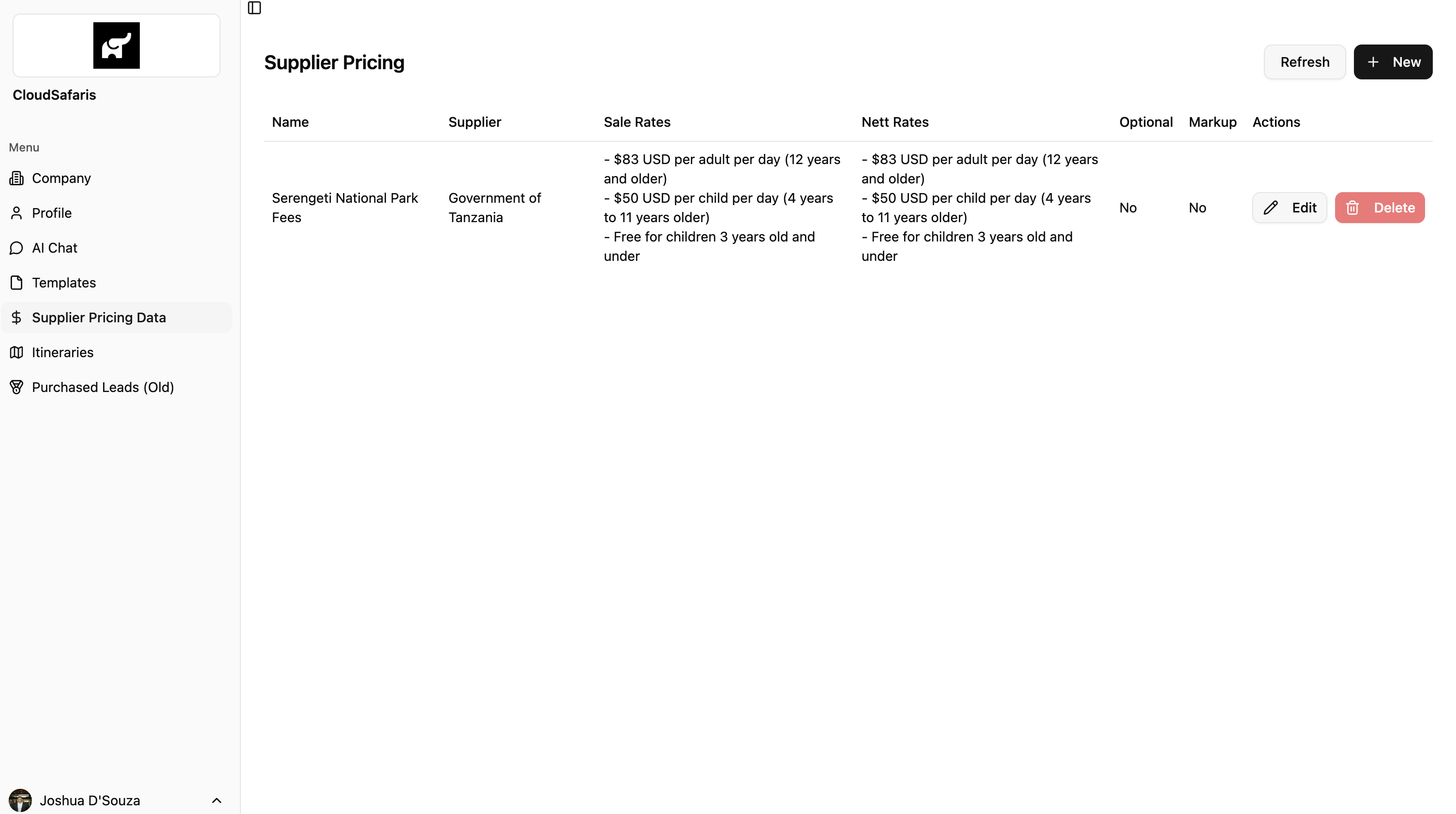
### Navigating to Supplier Pricing
To access this section, go to the dashboard:
👉 [https://simbas.ai/dashboard](https://simbas.ai/dashboard)
Then, click **“Supplier Pricing Data”** in the navigation menu.
 ### Adding Supplier Pricing Data
To add new supplier pricing data, click **“+ New”** in the top-right corner of the screen.
This will open a modal where you can enter all relevant supplier pricing details.
### Adding Supplier Pricing Data
To add new supplier pricing data, click **“+ New”** in the top-right corner of the screen.
This will open a modal where you can enter all relevant supplier pricing details.
 There are several required fields to complete when creating supplier pricing data.
This is the main **identifier** for the supplier pricing data.
Choose a **clear, descriptive name** so you can easily identify and retrieve it through the AI Chat.
> *Example:* If you name the entry **“Serengeti Park Fees”**, you can simply ask the AI Chat for “Serengeti Park Fees” to access that information.
This is the **name of the supplier** associated with the pricing data.
> *Example:* If the data belongs to **Miracle Experiences** (e.g., Balloon Safari), enter **“Miracle Experiences”** here.
These represent the **public-facing (rack) rates** for the supplier’s pricing data.
When you ask the AI Chat for “public rates,” it references these sale rates — serving as the **upper bound** for pricing.
You can write this information as **plain text** and organize it using **bullet points** for clarity.
These are the **private (nett) rates** charged by the supplier when invoicing you.
When you ask for “private rates” in the AI Chat, it will display these nett rates — helping you calculate **profit margins** and track your actual costs.
Like sale rates, this information can be entered as **plain text**, preferably formatted with **bullet points**.
Pricing rules define how a particular rate or item should be applied or calculated.
Examples include:
* Minimum number of travelers required to purchase the item
* Advance purchase requirements
* Seasonal availability (e.g., only valid during certain months)
* Dependencies (e.g., must be purchased with another item)
This field is **flexible and exhaustive** — use it to document **any rules or conditions** tied to the supplier’s pricing.
Plain text with **bullet points** is recommended for organization.
Enter the **email address** used to make reservations or bookings with the supplier.
Specify the **information needed to complete a booking** for this item.
Examples include:
* Number of adults and children
* Ages of children
* Honeymoon or special occasion details
* Full buyout options (e.g., private hot air balloon)
As with other fields, plain text with **bullet points** works best.
Indicates whether the supplier item is **mandatory or optional**.
This setting is primarily used for the upcoming **Dynamic Itineraries** feature and does not currently affect AI Chat functionality.
Determines whether the item should be **marked up** or **sold as-is** in future Dynamic Itinerary releases.
> *Example:* For **Government Park Fees**, you might choose *not* to apply a markup.
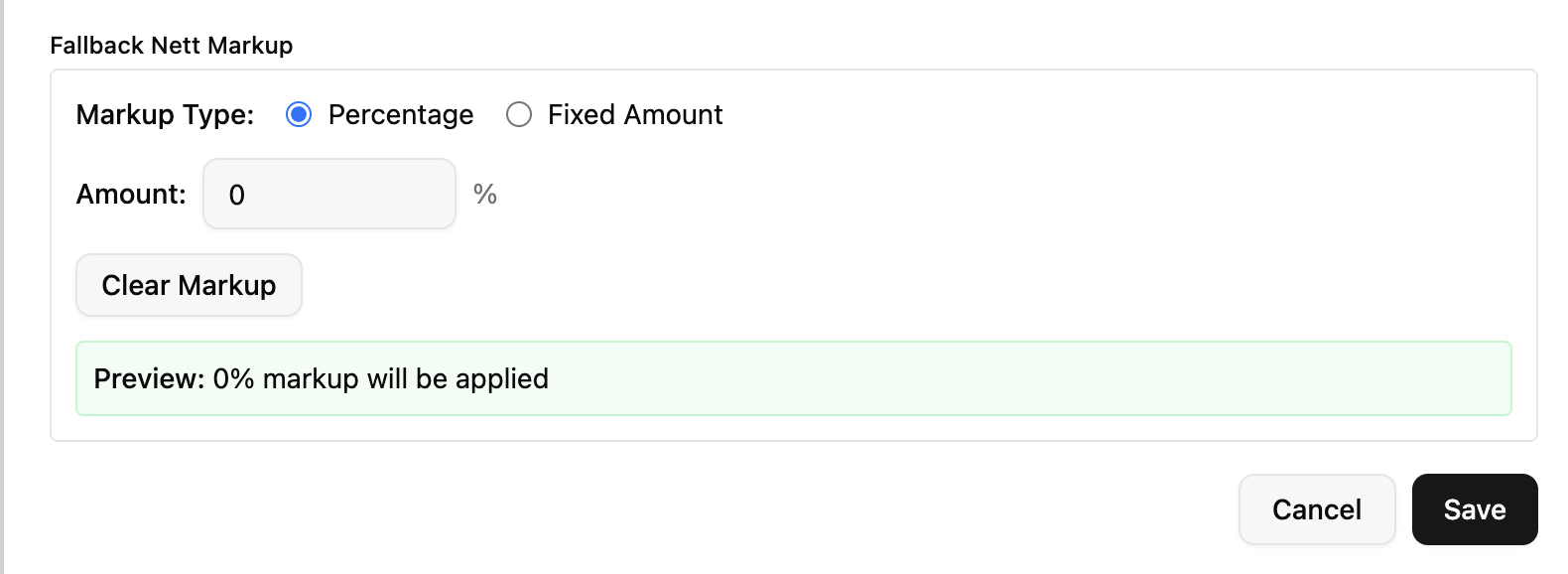
This field defines a **default markup** to apply when no **Sale (Rack)** rates are available.
It allows you to automatically adjust the **Nett Rates** by either:
* A **percentage** (adds the specified % on top of the Nett Rate), or
* A **fixed amount** (adds a set value to the Nett Rate)
This ensures consistent pricing even when public rates are missing.
There are several required fields to complete when creating supplier pricing data.
This is the main **identifier** for the supplier pricing data.
Choose a **clear, descriptive name** so you can easily identify and retrieve it through the AI Chat.
> *Example:* If you name the entry **“Serengeti Park Fees”**, you can simply ask the AI Chat for “Serengeti Park Fees” to access that information.
This is the **name of the supplier** associated with the pricing data.
> *Example:* If the data belongs to **Miracle Experiences** (e.g., Balloon Safari), enter **“Miracle Experiences”** here.
These represent the **public-facing (rack) rates** for the supplier’s pricing data.
When you ask the AI Chat for “public rates,” it references these sale rates — serving as the **upper bound** for pricing.
You can write this information as **plain text** and organize it using **bullet points** for clarity.
These are the **private (nett) rates** charged by the supplier when invoicing you.
When you ask for “private rates” in the AI Chat, it will display these nett rates — helping you calculate **profit margins** and track your actual costs.
Like sale rates, this information can be entered as **plain text**, preferably formatted with **bullet points**.
Pricing rules define how a particular rate or item should be applied or calculated.
Examples include:
* Minimum number of travelers required to purchase the item
* Advance purchase requirements
* Seasonal availability (e.g., only valid during certain months)
* Dependencies (e.g., must be purchased with another item)
This field is **flexible and exhaustive** — use it to document **any rules or conditions** tied to the supplier’s pricing.
Plain text with **bullet points** is recommended for organization.
Enter the **email address** used to make reservations or bookings with the supplier.
Specify the **information needed to complete a booking** for this item.
Examples include:
* Number of adults and children
* Ages of children
* Honeymoon or special occasion details
* Full buyout options (e.g., private hot air balloon)
As with other fields, plain text with **bullet points** works best.
Indicates whether the supplier item is **mandatory or optional**.
This setting is primarily used for the upcoming **Dynamic Itineraries** feature and does not currently affect AI Chat functionality.
Determines whether the item should be **marked up** or **sold as-is** in future Dynamic Itinerary releases.
> *Example:* For **Government Park Fees**, you might choose *not* to apply a markup.
This field defines a **default markup** to apply when no **Sale (Rack)** rates are available.
It allows you to automatically adjust the **Nett Rates** by either:
* A **percentage** (adds the specified % on top of the Nett Rate), or
* A **fixed amount** (adds a set value to the Nett Rate)
This ensures consistent pricing even when public rates are missing.
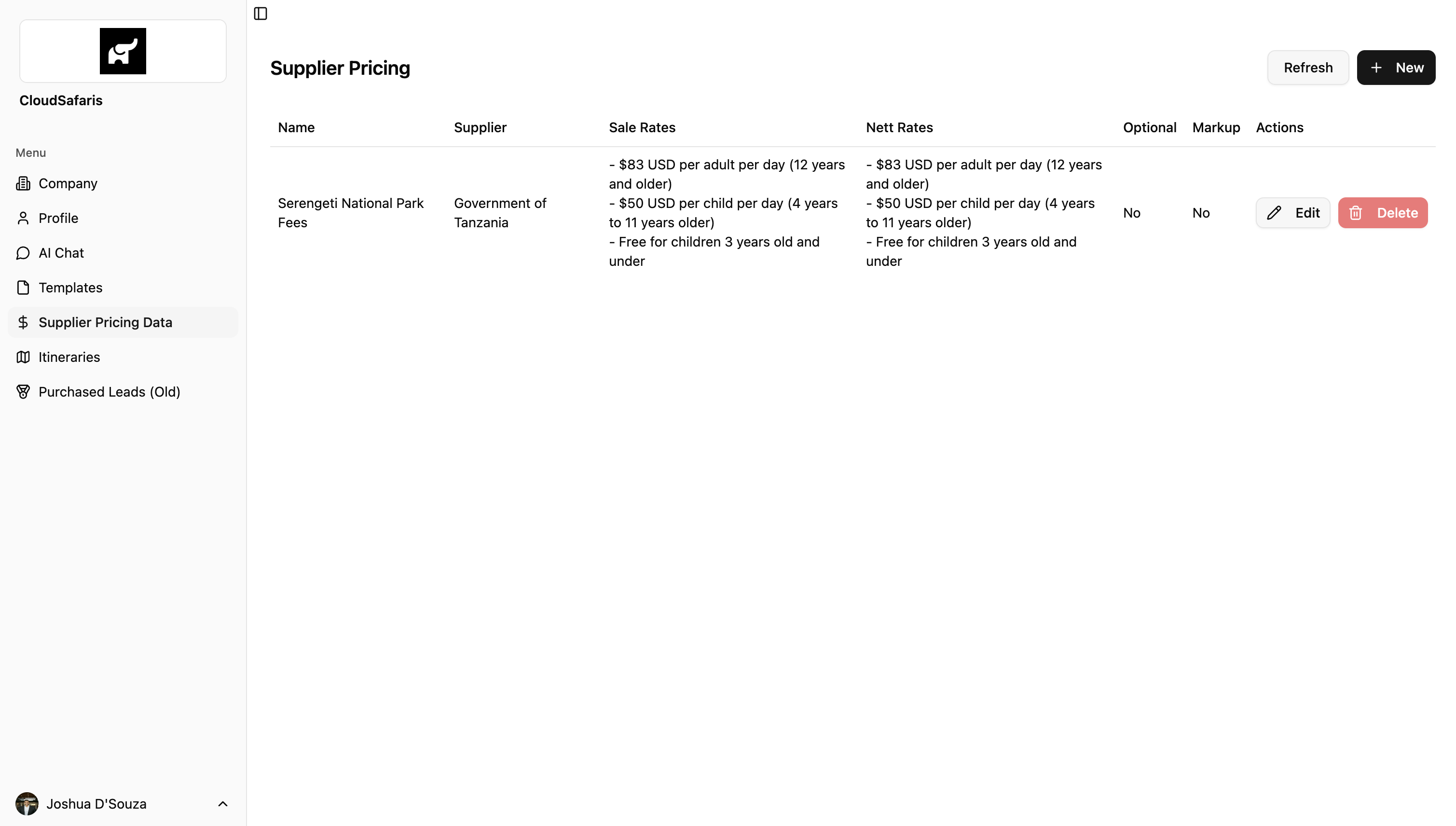
 Once all information is filled out, click **“Save”** to store the data under your organization.
> *Example:* The screenshot below shows **Serengeti National Park Fees** added to the Supplier Pricing Data table.
Once all information is filled out, click **“Save”** to store the data under your organization.
> *Example:* The screenshot below shows **Serengeti National Park Fees** added to the Supplier Pricing Data table.
 ### Accessing Data from the AI Chat
To retrieve supplier pricing data through the **AI Chat**, simply **search by name**.
An exact match isn’t required — the closer the name, the easier it is for the system to identify and return the correct data.
Once located, you can ask follow-up questions to access **any or all of the details** saved when creating that supplier pricing entry.
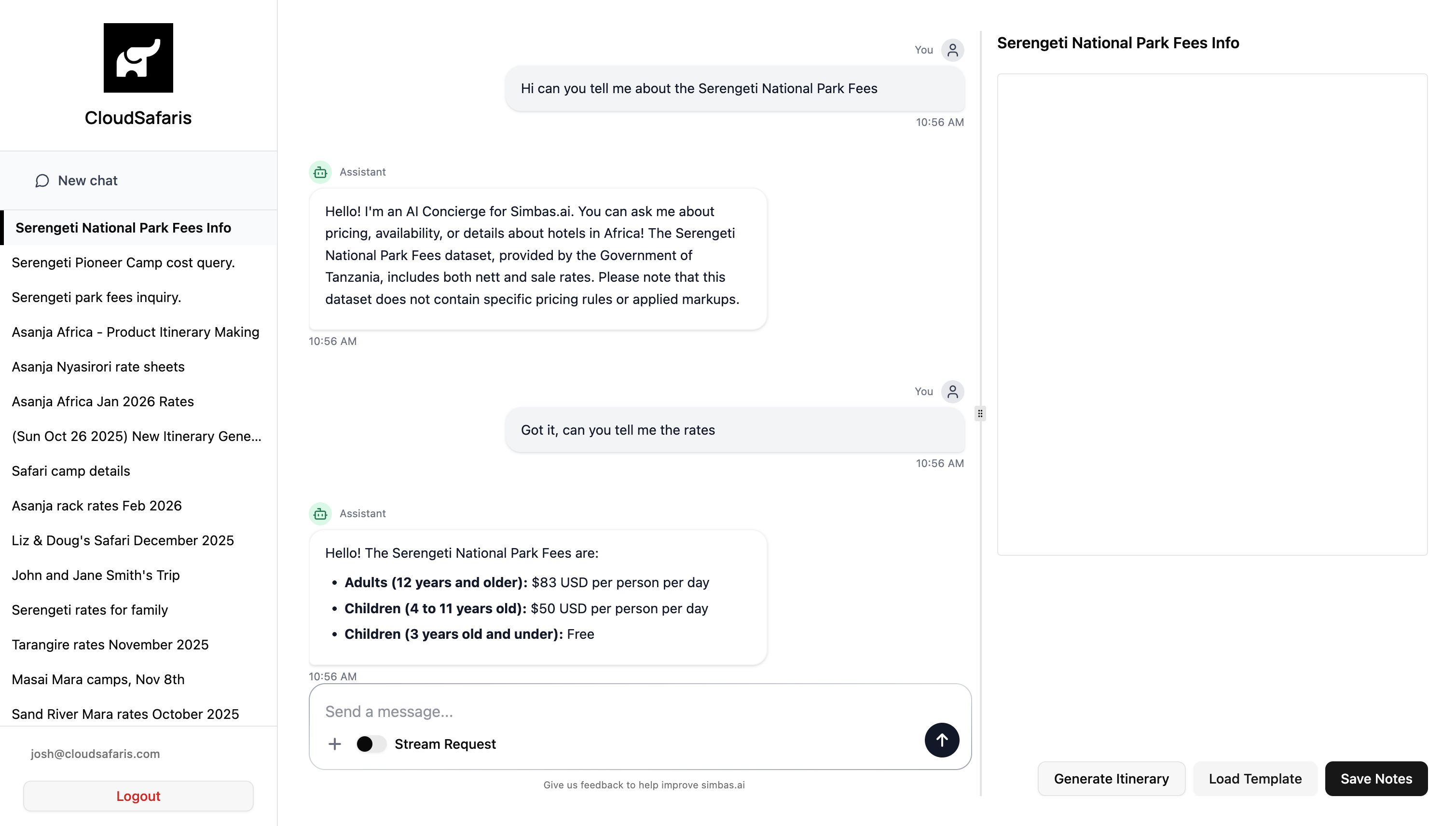
> *Example:* In the screenshot below, the supplier pricing data titled **“Serengeti National Park Fees”** is searched within AI Chat to display all related information.
### Accessing Data from the AI Chat
To retrieve supplier pricing data through the **AI Chat**, simply **search by name**.
An exact match isn’t required — the closer the name, the easier it is for the system to identify and return the correct data.
Once located, you can ask follow-up questions to access **any or all of the details** saved when creating that supplier pricing entry.
> *Example:* In the screenshot below, the supplier pricing data titled **“Serengeti National Park Fees”** is searched within AI Chat to display all related information.