
Create an Account
To create your Simbas.AI account, visit: 👉 https://simbas.ai/register?signup Follow the sign-up process to set up both your personal profile and your company profile.Logging In
If you already have an account, log in here: 👉 https://simbas.ai/registerNavigation
Once you’ve completed onboarding or logged in, you’ll be redirected to your dashboard, where you’ll find the main navigation menu. From here, you can easily access key sections of the platform — including your itineraries, properties, chat assistant, and account settings.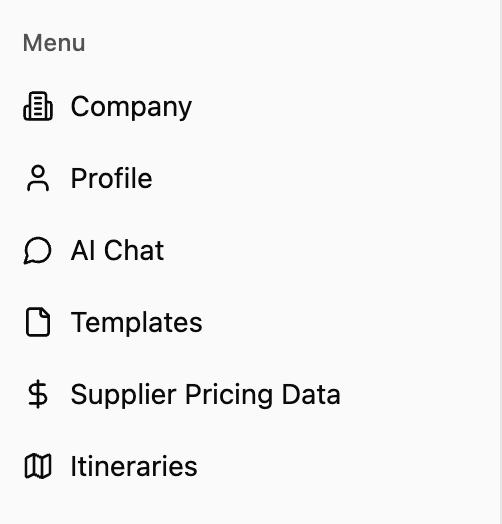
Company
Company
Selecting “Company” opens a pop-up where you can view and edit your company information, including business details, contact info, and branding preferences.
Profile
Profile
Selecting “Profile” opens a pop-up where you can edit your personal Simbas.AI profile, including your name, email, and account preferences.
AI Chat
AI Chat
AI Chat is one of Simbas.AI’s core features — a ChatGPT-style interface that lets you interact with your uploaded data in real time. Use it to check availability, rates, policies, and more, all through natural conversation.
Templates
Templates
Templates store structured notes and pre-set responses for your team. They allow for quick access to commonly used messages or itinerary components directly within the AI Chat notepad.
Supplier Pricing Data
Supplier Pricing Data
Supplier Pricing Data contains stored rate and availability information for your properties, lodges, or partners. This data is accessible through AI Chat and currently powers the Dynamic Itineraries (BETA) feature.
Itineraries
Itineraries
Selecting “Itineraries” takes you to the page where you can create a new itinerary from scratch or pre-generate one using AI. You can also view and manage all of your saved itineraries from this section.
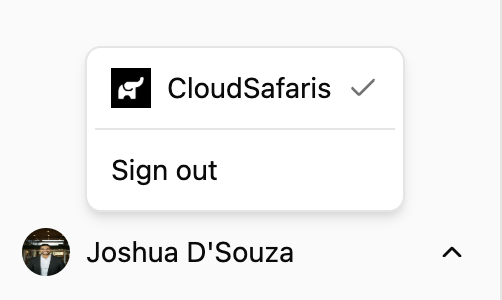
Profile & Account Options
At the bottom of the navigation menu, you’ll see your name and profile image. Clicking on your name opens a menu where you can:- Sign out of your account
- Switch between organizations, if you’re part of multiple teams or companies